

Introduction—Why Research Apps for Students are Essential

Modern academic success demands more than intelligence and effort. Today’s students navigate complex information landscapes where credibility matters and deadlines loom. Research Apps for Students transform how student research unfolds, addressing fundamental challenges from finding credible sources to maintaining academic integrity. Find the perfect research apps for students through our ultimate guide reviewing 30+ essential tools for research mastery in discovery, note-taking, and ethical citation. These digital tools empower student research by providing structured pathways through information chaos while developing critical literacy skills that extend beyond the classroom.
The High School Research Challenge: How to Choose the App for the Digital Age
Selecting the right academic research apps begins with understanding today’s unique pressures. Best research tools for students must address specific challenges that define modern student research software needs.
- The shift from library stacks to endless search results: Information overload has replaced scarcity as the primary challenge. Students face thousands of search results requiring credibility evaluation. Scholarly discovery tools filter digital noise, directing learners toward peer-reviewed sources rather than unreliable web content.
- The burden of academic integrity (plagiarism, proper citations): Attribution complexity has grown exponentially. Students must master multiple citation styles—MLA, APA, Chicago—across diverse source types. Citation apps for students automate formatting while teaching ethical practices that prevent plagiarism and protect academic reputation.
- Why traditional methods fail to keep up with demanding high school curricula: Research papers demand deeper analysis and interdisciplinary synthesis. Students juggle multiple subjects requiring real-time collaboration and multimedia presentations. Digital organization for research provides infrastructure that paper systems cannot match, teaching transferable skills essential for academic success.
The Power of an Optimized Research Toolkit: Responds to the Ultimate Guide to Efficiency
Tools for research mastery fundamentally transform academic performance by addressing workflow inefficiencies. Note-taking apps for research and organizing research papers apps create systematic approaches that reduce cognitive load and maximize learning outcomes.
- Defining “Research Apps”: These specialized tools support four essential research activities—gathering credible sources, organizing information systematically, analyzing data critically, and citing materials ethically. Best research tools for students integrate seamlessly across these functions, creating cohesive workflows rather than fragmented processes.
- How digital tools save time and boost critical thinking skills: Student research software eliminates manual tasks like reformatting citations or searching through scattered notes. This automation frees mental energy for higher-order thinking—evaluating arguments, synthesizing diverse perspectives, and developing original insights. Academic research apps make research processes visible and reproducible, teaching metacognitive skills.
- The promise of this guide: Efficiency, accuracy, and confidence. Research apps for students deliver measurable time savings while improving source quality and citation precision. This guide equips you with knowledge to select tools matching your learning style, budget, and academic requirements, building competence that translates into better grades and deeper understanding.
How to Choose the App and Use This Guide to Build Your Mastery
This comprehensive resource structures your journey through student research software selection systematically. Understanding how to choose a research app requires evaluating options against your specific academic needs and workflow preferences.
- A roadmap to the five essential phases of research: This guide organizes 30+ academic research apps into distinct categories—Discovery and Source Gathering, Organization and Note-Taking, Drafting and Citation Management, Quality Assurance and Proofreading, and Workflow Integration. Each phase addresses specific research challenges with targeted tool recommendations.
- The criteria for selection: Every tool featured meets rigorous standards for usability, cost-effectiveness, and high school relevance. We prioritize free research apps for college students or tools offering substantial student discounts. Usability assessments consider learning curves, cross-platform compatibility, and integration capabilities. Recommendations focus on tools proven effective in real academic contexts rather than trendy options lacking substance.
Need help with essays, dissertations, or case studies? StudentResearch.net provides secure, confidential academic support around the clock. Our experts craft customized work matching your exact requirements, offer free revisions, and guarantee satisfaction with transparent, student-friendly pricing.
Phase 1—Discovery, Curation, and Source Gathering: Best Research Apps for Students
Effective student research begins with locating credible, relevant sources efficiently. Research Apps for Students in this discovery phase filter information overload, directing learners toward scholarly databases while avoiding unreliable content. These academic research apps establish the foundation for quality work by ensuring every source meets rigorous credibility standards from project inception.
Accessing the Academic Web and Databases: How to Choose the App for Vetting Sources
Scholarly discovery tools separate quality academic content from general web clutter. Best research tools for students provide direct access to peer-reviewed journals, primary sources, and vetted databases essential for rigorous student research.
Why Students Go For It: Google Scholar provides free, immediate access to scholarly, peer-reviewed articles across all academic disciplines. Unlike general search engines that return commercial content and unreliable sources, Google Scholar exclusively indexes academic publications, making it the first stop for student research software needs. The platform’s familiar Google interface reduces learning curves while delivering professional-grade research capabilities.
Key Features: Advanced search filters enable precise queries by author, publication, date range, and citation count. The “Cited by” feature reveals how frequently other scholars reference a work, indicating its influence and credibility. Related articles suggestions expose students to broader conversations within their research topics. Library link integration connects students to full-text access through institutional subscriptions. Citation export functions facilitate seamless transfer to reference management tools.
Pricing: Completely free with no subscription requirements or advertisements.
JSTOR / Project MUSE
Why Students Go For It: These databases provide deep, trusted access to academic journals, historical archives, and primary sources often required for advanced research papers. JSTOR excels in humanities and social sciences, offering digitized journal archives dating back decades. Project MUSE specializes in current humanities and social science scholarship from university presses. Together, they represent gold-standard academic research apps for serious student research.
Key Features: Full-text article downloads in PDF format preserve original formatting and pagination for accurate citations. Advanced search capabilities filter by discipline, publication type, date range, and content type. Text analysis tools enable students to examine word frequency and thematic patterns across multiple documents. Reading lists and saved searches organize ongoing research projects. Mobile apps facilitate reading and annotation on tablets.
Pricing: Free access typically available through high school or public library institutional subscriptions. Limited free article access available for non-affiliated users.
Libby / Overdrive
Why Students Go For It: Libby revolutionizes student access to research materials by providing free, legal borrowing of thousands of audiobooks and eBooks through existing public library cards. This organizing research papers app excels for literature reviews, background reading, and accessing popular nonfiction that contextualizes academic topics. The platform democratizes research by removing financial barriers to quality sources.
Key Features: Seamless public library integration syncs multiple library cards into one interface. Adjustable reading speeds and font customization accommodate different learning preferences. Built-in note-taking and highlighting tools preserve insights for later citation. Audiobook functionality supports multitasking and auditory learning styles. Offline downloads enable research access without internet connectivity. Recommendation algorithms suggest related titles based on borrowing history.
Pricing: Completely free with valid public library card. No subscription fees or purchase requirements.
Newsela
Why Students Go For It: Newsela uniquely addresses reading comprehension challenges by offering current event articles and historical documents at five different reading levels. This academic research app ensures students at varying proficiency levels access identical content without oversimplification. The platform excels for social studies research, current events analysis, and primary source investigation, making complex materials accessible while maintaining intellectual rigor.
Key Features: Adjustable reading levels (from elementary to college) maintain content integrity while adapting vocabulary and sentence complexity. Built-in comprehension quizzes assess understanding and retention. Search functions locate historical texts, primary documents, and current news across topics. Text sets group related articles around themes for comprehensive topic exploration. Spanish translations support multilingual learners. Annotation tools enable close reading practices.
Pricing: Free basic access provides substantial content. Pro subscription unlocks premium features and additional article archives.
Critical Fact-Checking and Verification: How to Choose the App for Trusting Data
Digital organization for research demands verification tools that authenticate claims and expose misinformation. Research apps for students in this category teach critical evaluation skills while protecting academic integrity through systematic fact-checking protocols.
Google Fact Check Explorer (150 words)
Why Students Go For It: This essential tool verifies claims encountered during general web research, ensuring data accuracy before incorporation into academic work. Student research software must include verification mechanisms, and Google Fact Check Explorer aggregates professional fact-checking organizations’ assessments in one searchable interface. The tool prevents embarrassing errors and strengthens argumentation by eliminating debunked information.
Key Features: Search functionality queries thousands of fact-checks performed by credible organizations like PolitiFact, Snopes, and FactCheck.org. Results display truth ratings (False, Partly True, True) with explanatory context. Source transparency shows which organization performed the verification and when. Claim tracking reveals how misinformation spreads across platforms. Export functions enable citation of fact-checking sources in research papers.
Pricing: Completely free with no account requirements or usage limits.
Reverse Image Search (Google/TinEye)
Why Students Go For It: Visual content requires verification just like textual sources. Reverse image search determines image origins, contexts, and authenticity, fighting misinformation and confirming visual source credibility. These tools for research mastery prove essential when incorporating photographs, charts, infographics, or historical images into presentations and papers. They expose manipulated images and reveal proper attribution information.
Key Features: Upload or paste image URLs to trace visual content across the internet. Results show earliest appearances, highest resolution versions, and contextual usage. Google’s reverse image search integrates directly into browser workflows. TinEye specializes in tracking image modifications and edits over time. Both tools identify fake or misattributed historical photographs. Cross-referencing capabilities verify chart and infographic data sources.
Pricing: Both Google and TinEye reverse image search tools are completely free.
AllSides / Ground News
Why Students Go For It: Media literacy development requires understanding how different news outlets frame identical events. AllSides and Ground News showcase how left-leaning, centrist, and right-leaning sources cover the same topics, enabling balanced analysis essential for sophisticated student research. These best research tools for students combat confirmation bias by exposing diverse perspectives systematically.
Key Features: Side-by-side article comparisons reveal framing differences, word choice variations, and emphasis disparities. Media bias ratings for thousands of sources help students evaluate source positioning. Topic pages aggregate coverage across the political spectrum. Blind spot features identify stories receiving disproportionate attention from specific ideological perspectives. Newsletter digests deliver balanced news summaries. Educational resources explain bias identification techniques.
Pricing: Free basic access provides substantial functionality. Premium subscriptions offer advanced filtering, ad-free experiences, and expanded comparison tools.
Visual Brainstorming and Topic Curation: How to Choose the App for Idea Mapping
Note-taking apps for research extend beyond text to visual thinking tools. Citation apps for students work best when preceded by clear conceptual organization achieved through mind mapping and visual curation platforms.
SimpleMind / XMind
Why Students Go For It: Mind mapping transforms abstract research topics into visual hierarchies showing relationships between concepts, subtopics, and supporting evidence. These academic research apps excel during project planning phases, helping students outline arguments before drafting begins. Visual learners particularly benefit from seeing information structures spatially rather than linearly. Mind maps facilitate brainstorming sessions and reveal logical connections between seemingly disparate ideas.
Key Features: Drag-and-drop node creation enables rapid idea capture. Hierarchical structuring shows main topics, subtopics, and supporting details clearly. Export functionality converts maps to PDF outlines compatible with word processors. Cross-platform synchronization maintains access across devices. Customizable styling uses colors, icons, and images to enhance memory retention. Collaboration features support group project planning.
Pricing: Free basic versions provide core functionality. Pro versions add cloud synchronization and advanced export options.
Pinterest / Milanote
Why Students Go For It: Visual research projects in art history, design, architecture, historical events, and cultural studies benefit enormously from Pinterest and Milanote’s image-centric organization. These organizing research papers apps enable students to collect photographs, artwork, infographics, links, and text snippets onto customizable boards that function as visual bibliographies. The aesthetic presentation supports creative thinking while maintaining research rigor.
Key Features: Drag-and-drop interfaces accommodate mixed media content seamlessly. Web clippers save content directly from browsers to boards. Template options provide starting structures for different project types. Visual organization facilitates pattern recognition across sources. Collaboration features enable group boards for team projects. Pinterest’s discovery algorithm suggests related images and sources. Milanote’s canvas approach mimics physical mood boards digitally.
Pricing: Pinterest is completely free. Milanote offers free plans with storage limits; paid plans provide expanded capacity.
Wolfram Alpha
Why Students Go For It: Wolfram Alpha transcends traditional search by computing answers, generating visualizations, and providing step-by-step solutions for STEM research topics. This student research software functions as a computational knowledge engine, delivering verifiable facts, dynamic calculations, and data visualizations impossible through standard search tools. Mathematics, physics, chemistry, statistics, and computer science researchers find Wolfram Alpha indispensable for accessing accurate, computed information.
Key Features: Natural language processing interprets questions and generates precise answers. Step-by-step solution breakdowns teach problem-solving methodologies. Interactive visualizations display mathematical functions, statistical distributions, and scientific concepts dynamically. Data comparison tools analyze multiple variables simultaneously. Unit conversions and constant lookups provide reference information instantly. Download capabilities preserve computed results for citation and inclusion in papers.
Pricing: Basic functionality is free. Pro subscriptions remove advertisements and unlock advanced features including extended computation time and priority processing.# Research Apps for Students: The Ultimate Guide to 30+ Powerful & Essential Tools for Research Mastery: How to Choose the App that Meets Your Academic Needs
Phase 2—Organization, Reading, and Advanced Note-Taking: Essential Research Apps for Students
Information management separates successful student research from overwhelming chaos. Research Apps for Students in this organizational phase transform raw data into structured knowledge through systematic filing, annotation, and retrieval systems. Academic research apps for organization ensure students never lose critical insights while maintaining efficient access to accumulated materials.
Digital Filing Cabinets & Cloud Sync: How to Choose the App for Storage
Best research tools for students include reliable cloud storage ensuring materials remain accessible across devices. Student research software for organization prevents data loss while facilitating collaboration and backup security.
Google Drive / OneDrive / Dropbox
Why Students Go For It: Cloud storage platforms provide essential, reliable infrastructure ensuring all research materials—PDFs, drafts, notes, presentations—remain backed up, universally accessible, and ready for collaborative group work. These organizing research papers apps eliminate risks of hardware failure or lost USB drives. Cross-device synchronization means students access their complete research library from school computers, home laptops, tablets, or smartphones seamlessly.
Key Features: Real-time document collaboration enables multiple students to edit shared files simultaneously with visible change tracking. Automatic synchronization occurs continuously, eliminating manual backup requirements. Generous free storage tiers accommodate substantial research collections. Sharing controls manage permissions for group projects. Version history recovers previous document iterations. Mobile apps provide full functionality on smartphones and tablets. Integration with productivity suites streamlines workflows.
Pricing: Free basic storage (15GB Google Drive, 5GB OneDrive, 2GB Dropbox). Paid plans increase capacity significantly.
Notion
Why Students Go For It: Notion represents the ultimate all-in-one workspace for students building highly customized organizational systems. This student research software combines notes, to-do lists, research databases, class schedules, and project trackers in unified, interconnected pages. The flexibility accommodates diverse learning styles and project types while maintaining visual clarity. Students create personalized “second brains” that evolve with academic needs.
Key Features: Database functionality offers Kanban boards, list views, calendar displays, and gallery formats for varied visualization. Linked pages create wiki-like structures connecting related concepts. Rich media embeds incorporate videos, PDFs, and web content directly into notes. Free student templates provide starting frameworks for common academic tasks. Collaboration features support group project coordination. Mobile apps maintain full functionality across devices.
Pricing: Free Personal Plan offers substantial features. Educational plans frequently provide free Pro features to verified students.
Trello / Asana
Why Students Go For It: Visual project management tools excel for tracking multi-step research projects or coordinating group assignments using intuitive Kanban board interfaces. These tools for research mastery break complex projects into manageable tasks with clear deadlines and responsibility assignments. The visual nature helps students see project progress at a glance, reducing anxiety about overwhelming assignments.
Key Features: Customizable cards represent individual tasks with descriptions, attachments, checklists, and due dates. Drag-and-drop functionality moves tasks between status columns (To Do, In Progress, Complete). Multiple view options include lists, timelines, and calendars for different planning preferences. Collaboration features assign tasks to team members with notification systems. Label and filter systems organize complex projects. Automation rules reduce repetitive task management.
Pricing: Free basic versions provide core functionality. Paid tiers add advanced features like unlimited boards and automation.
Dynamic Annotation and PDF Reading: Responds to the Ultimate Guide to Deep Reading
Note-taking apps for research must support active reading through annotation and synthesis capabilities. Research apps for students in this category transform passive consumption into engaged analysis through highlighting, commenting, and cross-document connection features.
LiquidText
Why Students Go For It: LiquidText revolutionizes research synthesis by allowing users to “pinch” highlights and notes from multiple source documents into a separate workspace where connections and relationships become visible. This academic research app enables true comparative analysis impossible with traditional PDF readers. Students working with multiple sources simultaneously find LiquidText indispensable for seeing patterns and developing original arguments from disparate materials.
Key Features: Workspace area functions as an idea-gathering canvas where excerpts from different documents coexist. Direct linking connects notes to specific source passages, maintaining citation trails. Multi-document support imports numerous PDFs simultaneously. Gesture-based excerpting makes capturing relevant passages intuitive. Handwriting support accommodates stylus users. Export functionality preserves connections when transferring to word processors. Cloud synchronization maintains projects across devices.
Pricing: Free basic version limits document numbers. Pro version required for unlimited documents and full functionality.
GoodNotes / Notability
Why Students Go For It: These best-in-class applications serve students using tablets, particularly iPads, who integrate handwritten notes, digital typing, and annotated PDFs into searchable, organized notebooks. The apps bridge analog and digital workflows, preserving the cognitive benefits of handwriting while adding digital searchability and organization. Student research software for tablets rarely matches GoodNotes and Notability’s polish and functionality.
Key Features: PDF annotation tools include highlighting, commenting, shape drawing, and text insertion. Handwriting-to-text conversion makes handwritten notes searchable. Audio recording synced with notes (Notability) enables lecture capture with visual timestamps. Robust folder organization creates hierarchical notebook structures. Template libraries offer lined paper, graph paper, and specialized formats. Cloud backup protects work. Pen customization provides natural writing experiences.
Pricing: GoodNotes requires one-time purchase. Notability offers free download with premium subscription for advanced features.
Why Students Go For It: Adobe Acrobat Reader remains the industry-standard PDF reader, ensuring universal compatibility and providing reliable basic tools for highlighting, commenting, and bookmarking research materials. When professors distribute course readings or students access library databases, Adobe compatibility guarantees proper document rendering. This organizing research papers app represents the baseline expectation for PDF interaction across academic environments.
Key Features: Robust commenting tools include sticky notes, text highlights, and drawing markup. Reliable viewing maintains formatting across all platforms and devices. Cloud synchronization through Adobe Document Cloud keeps annotations accessible. Form-filling capabilities complete academic forms and worksheets. Page organization tools reorder, rotate, and extract pages. Mobile apps provide full reading functionality. Integration with Adobe ecosystem enables advanced workflows.
Pricing: Free for reading, viewing, and basic annotation. Paid Adobe Acrobat DC subscription unlocks editing capabilities.
Speechify / Natural Reader
Why Students Go For It: Text-to-speech applications convert dense research papers, web articles, and documents into high-quality audio, allowing students to “read” while commuting, exercising, or reviewing complex materials. These tools for research mastery accommodate auditory learners while enabling multitasking that maximizes limited study time. Listening to difficult texts sometimes improves comprehension compared to visual reading alone.
Key Features: Customizable voices include natural-sounding options across languages and accents. Speed control adjusts playback from slow explanatory pace to rapid review speeds. PDF and web page compatibility handles diverse content types. Offline reading enables audio access without internet connectivity. Highlighting synchronization shows currently read passages visually. Word tracking helps struggling readers follow along. Browser extensions integrate seamlessly into research workflows.
Pricing: Free versions with basic voices and limited monthly listening. Premium subscriptions unlock high-quality voices and unlimited usage.
Kami
Why Students Go For It: Kami specializes in collaborative PDF and document annotation, making it ideal for group research projects where multiple students analyze shared sources. This student research software integrates directly with Google Drive and Classroom, fitting seamlessly into educational technology ecosystems. The real-time collaboration features enable distributed teams to annotate documents together synchronously or asynchronously.
Key Features: Real-time collaborative annotation shows multiple users’ contributions simultaneously with color-coded identification. Comprehensive annotation toolkit includes highlighting, text boxes, shapes, drawings, and voice comments. Direct integration with Google Classroom streamlines assignment submission. Video and audio recording capabilities embedded within PDFs. Split-screen viewing displays multiple documents side-by-side. Accessibility features support diverse learning needs. Student and teacher versions optimize respective workflows.
Pricing: Free basic version available. Paid versions add advanced features and remove limitations.
Focused Study and Retrieval Practice: How to Choose the App for Retention
Citation apps for students serve little purpose without retained knowledge. Research apps for students emphasizing active recall and spaced repetition transform temporary exposure into durable understanding through systematic review protocols.
Evernote / OneNote
Why Students Go For It: These powerful, searchable notebook applications seamlessly capture and organize every content type—text, audio, photos, web clippings, handwritten notes—across all devices. The comprehensive nature makes them central hubs for student research software ecosystems. Students trust these platforms for long-term knowledge management spanning years of academic work, creating searchable external memory systems.
Key Features: OCR (Optical Character Recognition) technology makes text inside images and PDFs fully searchable. Web clipper browser extensions save articles, screenshots, and simplified pages with one click. Robust tagging systems create flexible organizational structures beyond folders. Notebook stacks create hierarchical organization. Template galleries provide starting points for common note types. Collaboration features enable shared notebooks. Extensive third-party integrations connect to productivity ecosystems.
Pricing: Free basic plans offer substantial storage and features. Premium subscriptions expand storage limits and add advanced capabilities.
Quizlet
Why Students Go For It: Quizlet transforms key facts, vocabulary, and concepts extracted from research into engaging, interactive study sets and games for effective memorization. This best research tool for students makes rote learning enjoyable through gamification while providing proven learning modes based on cognitive science. The platform’s massive library contains millions of pre-made study sets covering virtually every academic topic.
Key Features: Flashcard creation supports text, images, and audio for multimodal learning. Learn Mode adapts difficulty based on individual performance, focusing attention on problematic cards. Matching games and other activities provide variety preventing study monotony. Test mode generates practice exams from study sets. Collaborative study sets enable group creation and sharing. Mobile apps facilitate studying anywhere. Progress tracking shows mastery levels and time invested.
Pricing: Free version includes advertisements. Plus subscription removes ads and unlocks advanced study modes.
Anki
Why Students Go For It: Anki employs a superior spaced repetition system (SRS) that schedules flashcard reviews based on individual difficulty ratings, maximizing long-term retention while minimizing wasted study time on already-mastered facts. This student research software represents the gold standard for serious students preparing for AP exams, SATs, or comprehensive research projects requiring extensive factual knowledge. The algorithm’s effectiveness significantly exceeds traditional study methods.
Key Features: Highly customizable flashcard creation accommodates complex content including images, audio, LaTeX mathematical notation, and formatting. Powerful SRS algorithm adapts to individual learning patterns, scheduling reviews at optimal intervals. Statistics tracking provides detailed performance analytics. Deck sharing enables collaborative study. Add-on system extends functionality extensively. Synchronization across devices maintains study progress. Large community provides pre-made deck libraries.
Pricing: Free for Windows, Mac, Android, and web platforms. iOS app requires one-time purchase.
Phase 3—Drafting, Citation, and Academic Integrity: Top Research Apps for Students
Producing polished, ethically-sound final papers requires specialized tools ensuring proper formatting and citation accuracy. Research Apps for Students in this critical phase protect academic integrity while streamlining technical requirements that distract from content development. These academic research apps transform rough drafts into submission-ready work through systematic editing and verification processes.
Automated Citation & Reference Management: How to Choose the App for Bibliographies
Best research tools for students automate complex citation formatting across multiple style guides. Student research software for reference management eliminates manual bibliography creation while teaching proper attribution practices essential for academic honesty.
Zotero
Why Students Go For It: Zotero represents the free, open-source gold standard for comprehensive reference management, functioning as a personal research assistant that collects, organizes, and cites sources in nearly every format imaginable. Academic researchers and students alike trust Zotero’s reliability and flexibility. The software’s open-source nature ensures longevity without subscription dependencies, making it ideal for multi-year research projects.
Key Features: Browser connector enables one-click source capture from library databases, websites, and online catalogs with automatic metadata extraction. Direct integration with Microsoft Word and Google Docs inserts citations and generates bibliographies dynamically. Support for over 9,000 citation styles covers MLA, APA, Chicago, and specialized discipline-specific formats. PDF management and annotation keep sources and notes together. Group libraries facilitate collaborative bibliography building. Cloud synchronization maintains libraries across devices.
Pricing: Completely free with optional paid storage upgrades for extensive PDF libraries.
Mendeley
Why Students Go For It: Mendeley combines excellent reference management with strong social and collaboration features, creating academic networking opportunities alongside citation functionality. This organizing research papers app excels for students working on group projects or those wanting to discover research through scholarly social networks. The platform bridges individual research management and collaborative knowledge sharing seamlessly.
Key Features: PDF annotation tools enable highlighting and note-taking within the reference manager. Collaboration features support shared group libraries for team bibliographies. Desktop and web library synchronization provides access anywhere. Citation plugin integrates with Microsoft Word for in-text citations and bibliography generation. Social discovery features recommend articles based on reading history. Research metrics track citation impact. Mobile apps extend functionality to tablets and smartphones.
Pricing: Free basic version provides substantial storage. Premium subscriptions expand storage and add advanced features.
NoodleTools / EasyBib
Why Students Go For It: These platforms offer the simplest, most beginner-friendly citation generation tools, often preferred by high school libraries for guided interfaces ensuring even complex source types receive correct formatting. Citation apps for students starting their research journey benefit from step-by-step guidance reducing citation anxiety. The platforms teach citation principles while handling technical formatting details.
Key Features: Form-based citation creation walks students through required fields for each source type systematically. Automatic bibliography generation compiles citations in proper alphabetical order with correct formatting. Source note-taking features (NoodleTools) connect bibliographic entries to research notes. Export options transfer bibliographies to word processors. Educational tutorials explain citation concepts and academic integrity. Teacher integration enables assignment submission and feedback.
Pricing: EasyBib offers free basic citation generation with limited features. NoodleTools typically requires school subscription purchase.
Logically.app (formerly Anara)
Why Students Go For It: Logically.app harnesses artificial intelligence to generate research insights, create accurate style-correct citations from uploaded documents or web links, and even convert sources into study materials automatically. This student research software represents the cutting edge of AI-assisted academic work, dramatically reducing time spent on mechanical citation tasks while maintaining accuracy. The AI summarization helps students process sources more efficiently.
Key Features: AI-powered summarization extracts key points from lengthy articles and documents. Automatic citation generation produces properly formatted references in multiple styles from URLs or uploaded files. Document-to-flashcard conversion creates study materials from research sources. Question generation helps students test comprehension. Integration with note-taking apps streams workflows. Multi-source synthesis identifies connections across documents. Research assistant chatbot answers questions about uploaded materials.
Pricing: Free basic tier available with usage limits. Subscription unlocks premium AI models and removes restrictions.
Writing Assistance and Proofreading: Responds to the Ultimate Guide to Polishing Your Draft
Tools for research mastery extend beyond content to presentation quality. Note-taking apps for research culminate in polished drafts requiring systematic editing for grammar, clarity, style, and readability before submission.
Grammarly
Why Students Go For It: Grammarly provides essential, highly accurate detection of grammar, punctuation, and spelling errors, freeing students to focus on content quality and argumentation rather than mechanical correctness. This academic research app functions as a personal editor available 24/7, catching mistakes that fatigue or inexperience cause students to miss. The platform’s ubiquity across writing contexts—emails, social media, documents—makes it invaluable.
Key Features: Browser extension works across websites, email, and online platforms. Platform integration with Google Docs, Microsoft Word, and other writing software provides seamless editing. Tone detection helps students maintain appropriate academic register. Clarity suggestions identify confusing sentences requiring revision. Engagement metrics assess readability. Plagiarism detection (Premium) compares text against billions of web pages. Performance statistics track improvement over time.
Pricing: Free basic version catches fundamental errors. Premium subscription adds style checking, advanced suggestions, and plagiarism detection.
Hemingway Editor
Why Students Go For It: Hemingway Editor improves clarity and readability by highlighting overly dense sentences, excessive passive voice, and needlessly complex vocabulary, forcing students to write more directly and powerfully. This best research tool for students emphasizes concision and strength, valuable lessons for academic writing often plagued by wordiness. The color-coded visual feedback makes revision priorities immediately apparent.
Key Features: Readability score provides grade-level assessment encouraging appropriate complexity. Color-coded highlighting identifies different sentence issues—hard to read (yellow), very hard to read (red), passive voice (green), simpler alternatives available (purple). Adverb and weak phrase detection strengthens verb choices. Word and character counts track document length. Formatting preservation maintains document structure. Distraction-free writing mode enables focused drafting.
Pricing: Web application completely free. Desktop application requires one-time purchase for offline access.
ProWritingAid
Why Students Go For It: ProWritingAid delivers deep, comprehensive analysis of writing style, consistency, word choice, and structural issues, functioning as a personal editor providing professional-level academic polish. This student research software goes beyond basic grammar checking to examine deeper writing patterns, helping students develop sophisticated academic voices. The extensive reporting system educates while correcting.
Key Features: Twenty different writing reports analyze various aspects—grammar, style, overused words, clichés, redundancy, sentence structure, consistency, plagiarism. Style suggestions improve academic register and formality. Integration with Microsoft Word, Google Docs, Scrivener, and browsers. Contextual thesaurus provides synonyms within the editing interface. Writing goals setting enables consistency checking. Detailed explanations teach writing principles. Progress tracking shows improvement over time.
Pricing: Free basic version with limited daily word count. Premium subscription unlocks all reports and removes limits.
Thesaurus/Dictionary Apps (e.g., Merriam-Webster)
Why Students Go For It: Reliable dictionary and thesaurus applications ensure vocabulary precision and contextual correctness, preventing students from misusing sophisticated words while verifying definitions instantly. These organizing research papers apps serve as essential reference tools during drafting and revision, building vocabulary alongside research skills. Confident word choice strengthens argumentation and demonstrates academic maturity.
Key Features: Comprehensive definitions include pronunciations, etymologies, and usage notes. Example sentences demonstrate proper contextual application. Synonym and antonym listings expand vocabulary options. Voice search enables hands-free lookup. Word of the day features build vocabulary systematically. Favorites lists create personal word banks. Offline functionality ensures access without internet. Audio pronunciations prevent mispronunciation embarrassment.
Pricing: Free versions include advertisements. Paid versions remove ads and add advanced features.
Plagiarism & Integrity Checks: How to Choose the App for Academic Honesty
Citation apps for students must pair with plagiarism detection ensuring originality. Research apps for students focused on academic integrity prevent unintentional violations while teaching proper paraphrasing and attribution practices.
Turnitin (for students)
Why Students Go For It: Turnitin allows students to understand the originality report interface their teachers use, enabling identification and correction of poorly paraphrased sections before final submission. This student research software transforms plagiarism detection from punitive threat to educational tool, teaching students to recognize problematic similarities and improve paraphrasing skills. Self-checking reduces submission anxiety significantly.
Key Features: Similarity index reporting quantifies percentage of text matching other sources. Source highlighting color-codes matched passages for easy identification. Detailed source listings show exactly where similar text appears. AI writing detection flags potentially AI-generated content. Feedback studio enables instructor comments and grading. Revision comparison tracks changes between drafts. Educational resources explain proper citation and paraphrasing techniques.
Pricing: Accessed through school or institutional licenses, typically free for students with educator accounts.
Scribbr Plagiarism Checker
Why Students Go For It: Scribbr provides consumer-level, fast, trusted plagiarism checking for pre-submission draft verification against extensive databases of web and academic sources, offering peace of mind before using institutional tools. This academic research app gives students control over the checking process, enabling iterative revision without penalty. The detailed reports explain matched passages and suggest corrections.
Key Features: High-speed scanning compares documents against billions of web pages and academic publications. Detailed reporting highlights matched text with source links. Similarity percentage calculations quantify originality levels. Citation checking verifies reference formatting accuracy. Clear explanations distinguish problematic matches from proper citations. Privacy protection ensures uploaded documents remain confidential. Multiple file format support accepts Word, PDF, and text files.
Pricing: Paid per-document service, priced by word count. No subscription required.
Conclusion—The Ultimate Research App Toolkit Strategy
Building an effective personal toolkit from available research apps for students requires strategic selection matching individual learning styles and project requirements. Student research software choices determine efficiency, work quality, and academic success trajectories. These academic research apps represent investments in skills transcending individual assignments to shape lifelong learning capabilities.
Deciding Your Tech Stack: How to Choose the App Based on Three Crucial Factors
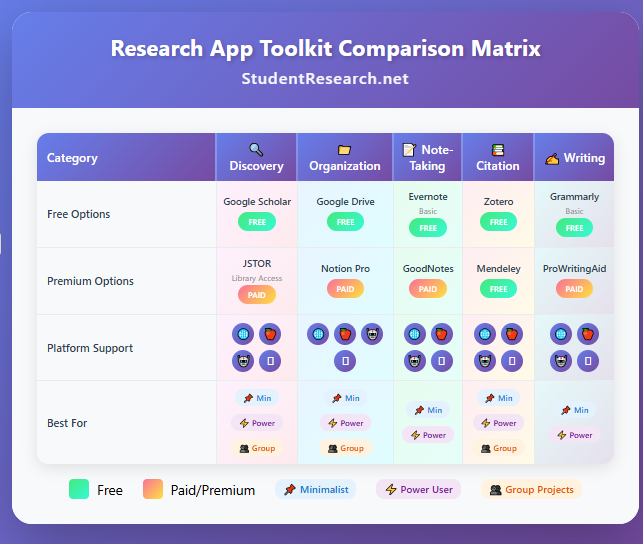
Best research tools for students rarely function in isolation. Tools for research mastery work synergistically when selected for compatibility and workflow integration rather than features alone.
Integration: Choosing apps that “talk” to each other creates seamless workflows where information flows effortlessly between discovery, organization, drafting, and citation phases. For example, Zotero integrates with Google Drive, Microsoft Word, and Notion, enabling students to capture sources, store PDFs, take notes, and insert citations without switching contexts. Organizing research papers apps that export to common formats ensure compatibility. Prioritize platforms with robust APIs and documented integration capabilities.
Platform Lock-in: Device ecosystem compatibility prevents frustration and ensures consistent experiences. Apple users benefit from GoodNotes and Notability’s iPad optimization, while Android users need cross-platform alternatives like OneNote. Windows users should verify software availability. Web-based student research software offers platform independence but may sacrifice advanced features. Consider your primary devices and whether family, school, or library resources dictate specific platforms before committing to paid tools.
Pricing Tiers: Maximizing free tiers and educational discounts makes comprehensive toolkits affordable. Many citation apps for students offer free basic versions sufficient for high school needs. Research apps for students often provide student discount programs requiring educational email verification. Free research apps for college students include Google Scholar, Zotero, and Evernote basic. Build around free foundations, adding paid tools only when free alternatives prove insufficient.
Building Your Personalized Research Workflow: Responds to the Ultimate Guide to Strategy
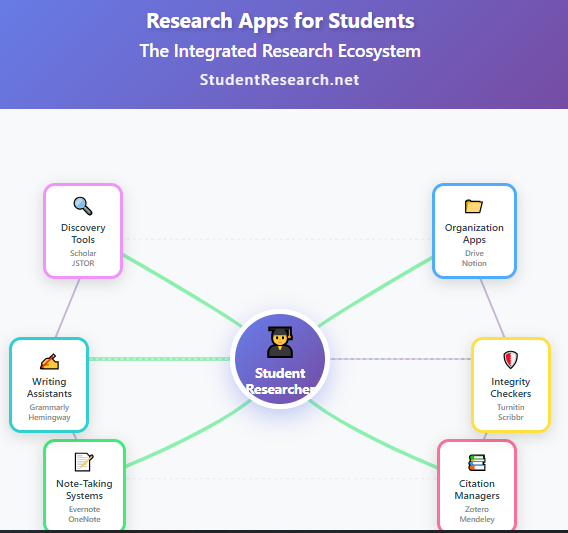
Workflow customization reflects individual research styles and project complexity. Note-taking apps for research serve different students differently based on learning preferences and academic demands.
The Minimalist Workflow (3-5 apps for simplicity): Students seeking streamlined approaches might select Google Scholar for discovery, Google Drive for storage, Google Docs with Grammarly for drafting, and Zotero for citations. This academic research app ecosystem minimizes learning curves while providing comprehensive functionality. The integration between Google products creates natural workflows. Adding one specialized tool like Quizlet for memorization or Hemingway for editing rounds out capabilities without overwhelming.
The Power User Workflow (7-10 apps for deep, long-term research): Advanced students tackling sophisticated multi-month research projects benefit from specialized tools at each phase. Discovery combines Google Scholar, JSTOR, and AllSides. Organization employs Notion for project management, LiquidText for synthesis, and Evernote for permanent notes. Drafting uses Google Docs with ProWritingAid. Citations leverage Zotero. Study relies on Anki’s spaced repetition. This student research software suite requires investment in learning multiple platforms but delivers professional-grade capabilities.
A Look Ahead: AI and the Future of Student Research: Responds to the Ultimate Guide to New Tools
Artificial intelligence increasingly influences best research tools for students. Understanding ethical AI applications while maintaining critical oversight defines responsible integration of these powerful organizing research papers apps.
Ethical uses of AI (e.g., AI summarizing, idea generation): Tools like Logically.app demonstrate AI’s legitimate research support roles. AI summarization helps students process lengthy sources efficiently, identifying key arguments for deeper reading. Idea generation prompts combat writer’s block and suggest analytical angles students might miss. Translation tools make foreign-language sources accessible. Citation assistance reduces formatting errors. These citation apps for students augment human intelligence rather than replacing critical thinking. The key distinction: AI assists research processes but never substitutes for original analysis and argumentation.
The importance of human oversight and critical verification: Research apps for students incorporating AI require vigilant verification. AI-generated summaries sometimes misrepresent nuanced arguments or invent nonexistent details. Students must read original sources, not rely solely on AI interpretations. AI citation generators occasionally produce incorrect formatting or incomplete references requiring manual checking. Plagiarism risks emerge when students inadequately paraphrase AI-generated text. Student research software users bear ultimate responsibility for accuracy, originality, and integrity regardless of AI assistance. Developing verification habits—cross-referencing claims, consulting original sources, running plagiarism checks—remains essential even as AI capabilities expand.
Final Thoughts and Your Next Step: How to Choose the App to Start With
Academic research apps empower rather than constrain when selected thoughtfully. Tools for research mastery develop alongside students, accommodating increasing sophistication as skills grow. Find the perfect research apps for students through our ultimate guide reviewing 30+ essential tools for research mastery in discovery, note-taking, and ethical citation.
Start your journey by selecting one tool from each major category: choose a discovery platform (Google Scholar for most students), an organization system (Notion or Google Drive), a note-taking application (Evernote or OneNote), a citation manager (Zotero), and a writing assistant (Grammarly free version). Master these foundations before expanding your toolkit. Remember that best research tools for students serve your learning, not vice versa. Experiment, adapt, and build workflows matching your unique strengths and needs. The investment in learning student research software today pays dividends throughout academic careers and professional lives, transforming research from overwhelming burden into empowering intellectual adventure.
The criteria for selection: Every tool featured meets rigorous standards for usability, cost-effectiveness, and high school relevance. We prioritize free research apps for college students or tools offering substantial student discounts. Usability assessments consider learning curves, cross-platform compatibility, and integration capabilities. Recommendations focus on tools proven effective in real academic contexts rather than trendy options lacking substance.
Worried your research paper won’t meet professor expectations? StudentResearch.net delivers customized, high-quality work for all assignments and projects. Round-the-clock support, secure data protection, free revisions until perfect, and satisfaction guarantees ensure excellence you can trust confidently.

